Media Controller & Sub-devices
Modern embedded camera hardware rarely presents a single self-contained /dev/video0 node. Instead, MIPI CSI-2 sensors, deserializers, hardware receivers, image signal processors (ISPs), and encoders form a pipeline graph exposed through a /dev/media* controller alongside one or more /dev/v4l-subdev* control nodes. The v4l2 package provides native CGO_ENABLED=0 support for querying topologies, toggling links, configuring pad formats, and managing sub-device stream routing.
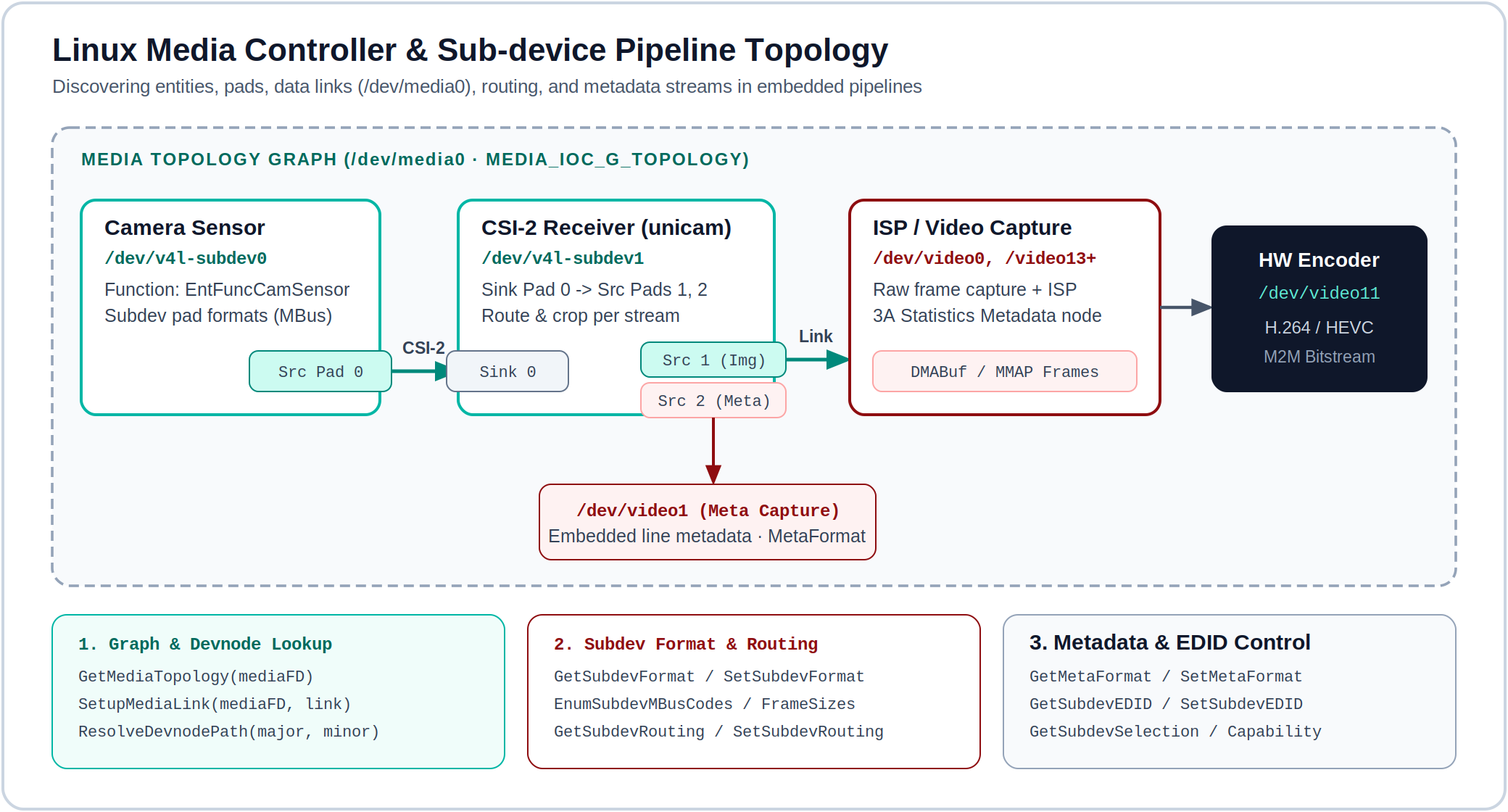
Inspecting /dev/media* topology graphs
Start from a Media Controller device node (/dev/media0) to discover every entity in the pipeline, see which character device interfaces belong to each entity, and inspect active or disabled pad links:
mfd, err := v4l2.OpenDevice("/dev/media0", sys.O_RDWR|sys.O_CLOEXEC, 0)
if err != nil {
    log.Fatal(err)
}
defer v4l2.CloseDevice(mfd)

info, err := v4l2.GetMediaDeviceInfo(mfd)
if err != nil {
    log.Fatal(err)
}
fmt.Printf("Media: driver=%s model=%s\n", info.Driver, info.Model)

topo, err := v4l2.GetMediaTopology(mfd)
if err != nil {
    log.Fatal(err)
}
for _, ent := range topo.Entities {
    fmt.Printf("Entity %d: %s\n", ent.ID, ent.Name)
    for _, intf := range topo.EntityInterfaces(ent.ID) {
        nodePath, _ := v4l2.ResolveDevnodePath(intf.Major, intf.Minor)
        fmt.Printf("  node=%s\n", nodePath)
    }
}
GetMediaTopology issues the two-phase MEDIA_IOC_G_TOPOLOGY protocol automatically (first sizing entity/interface/pad/link arrays, then filling pinned slices cleanly). Helper methods on MediaTopology—FindEntityByName, FindEntitiesByFunction, EntityPads, EntityInterfaces, PadLinks, DataLinks, and InterfaceLinks—let you traverse the graph without manual ID bookkeeping. Calling ResolveDevnodePath(intf.Major, intf.Minor) resolves character device major/minor pairs through /sys/dev/char/... directly to paths such as /dev/video0 or /dev/v4l-subdev0.
To enable or disable a mutable pipeline link between a source pad and a sink pad, pass a populated MediaLinkDesc to v4l2.SetupMediaLink(mfd, link) (MEDIA_IOC_SETUP_LINK). See examples/media_topology/.
Negotiating /dev/v4l-subdev* pad formats and selections
Once you locate a sensor or CSI-2 bridge sub-device node (such as /dev/v4l-subdev0), open it directly to inspect supported media-bus pixel codes, discrete frame sizes, frame intervals, pad selections, and active vs. try formats:
sfd, err := v4l2.OpenDevice("/dev/v4l-subdev0", sys.O_RDWR|sys.O_CLOEXEC, 0)
if err != nil {
    log.Fatal(err)
}
defer v4l2.CloseDevice(sfd)

// Inspect the active format on pad 0
fmtPad, err := v4l2.GetSubdevFormat(sfd, 0, v4l2.SubdevFormatActive)
if err != nil {
    log.Fatal(err)
}
fmt.Printf("Pad 0: %dx%d mbus=0x%04x (%s)\n",
    fmtPad.Format.Width, fmtPad.Format.Height,
    fmtPad.Format.Code, v4l2.MBusFormatNames[fmtPad.Format.Code])

// Enumerate supported media-bus codes on pad 0
codes, err := v4l2.EnumSubdevMBusCodes(sfd, 0, v4l2.SubdevFormatActive)
if err == nil {
    for _, c := range codes {
        fmt.Printf("Supported MBus: 0x%04x (%s)\n", c.Code, v4l2.MBusFormatNames[c.Code])
    }
}
Use v4l2.SubdevFormatTry when negotiating configurations without mutating live hardware state, then pass v4l2.SubdevFormatActive with SetSubdevFormat to commit validated widths, heights, colorspaces, and MBusFormatCode values. For sensor readout cropping and native pixel-array queries, call v4l2.GetSubdevSelection / v4l2.SetSubdevSelection with SelTargetNativeSize, SelTargetCropBounds, or SelTargetCrop. See examples/subdev_pipeline/.
Sub-device capabilities and multiplexed stream routing
For CSI-2 multiplexers, virtual channels, and multi-stream sub-devices (such as embedded metadata alongside pixel frames), Linux V4L2 exposes capability probing, stream-aware client flags, and routing tables:
cap, err := v4l2.GetSubdevCapability(sfd)
if err == nil && cap.SupportsStreams() {
    // Advertise stream-aware client support before configuring routes
    _, _ = v4l2.SetSubdevClientCapability(sfd, v4l2.SubdevClientCapStreams)

    routes, err := v4l2.GetSubdevRouting(sfd, v4l2.SubdevFormatActive)
    if err == nil {
        for _, r := range routes {
            fmt.Printf("Route: sink=%d/%d -> src=%d/%d active=%v\n",
                r.SinkPad, r.SinkStream, r.SourcePad, r.SourceStream, r.IsActive())
        }
    }
}
Calling SetSubdevClientCapability(sfd, v4l2.SubdevClientCapStreams) tells kernel sub-device drivers that your process understands stream IDs when calling GetSubdevRouting (VIDIOC_SUBDEV_G_ROUTING) or updating active routes via SetSubdevRouting (VIDIOC_SUBDEV_S_ROUTING).