Formats, Multi-Planar, Selection & Metadata
Negotiating how a camera, ISP, or capture card lays out pixel bytes is essential before allocating streaming buffers. Drivers can store pixels in one contiguous array (PixFormat), split YUV planes across separate discontiguous buffers (PixFormatMPlane), crop or compose sub-regions (Selection), stream out-of-band sensor/3A statistics (MetaFormat), and report display sink timing via HDMI EDID (EDID).
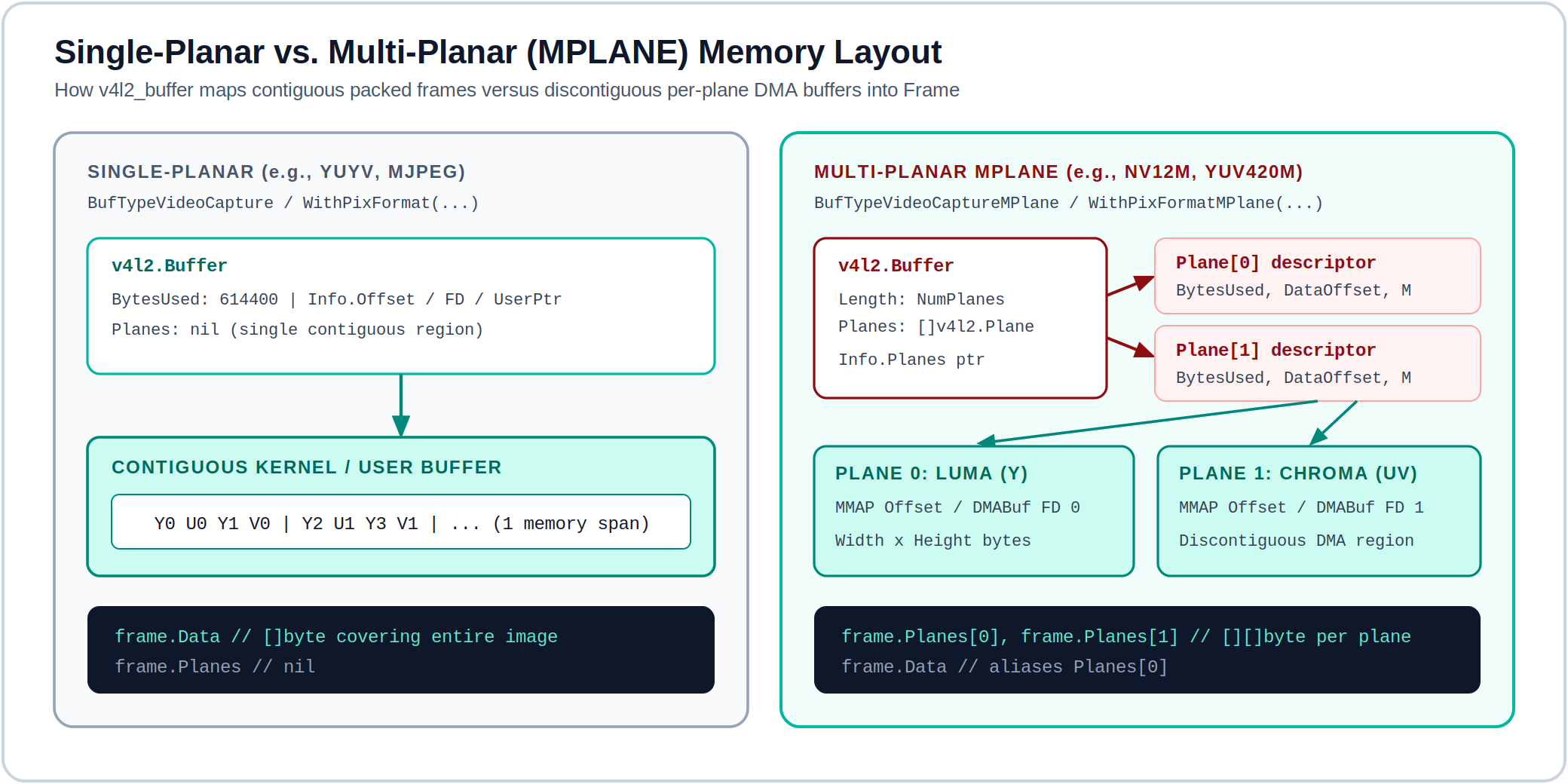
Single-planar pixel formats
Single-planar devices expose one contiguous memory buffer per frame. Enumerate supported formats on an open Device with GetFormatDescriptions(), then read or update v4l2.PixFormat:
descs, err := dev.GetFormatDescriptions()
if err == nil {
    for _, d := range descs {
        fmt.Printf("Format: %s (FourCC=0x%08x)\n", d.Description, d.PixelFormat)
    }
}

pix, err := dev.GetPixFormat()
if err != nil {
    log.Fatal(err)
}
pix.Width = 1280
pix.Height = 720
pix.PixelFormat = v4l2.PixelFmtYUYV
if err := dev.SetPixFormat(pix); err != nil {
    log.Fatal(err)
}
Use v4l2.GetFormatFrameSizes and v4l2.GetFormatFrameInterval when you need the exact discrete resolutions or stepwise min/max ranges paired with each pixel format. Common FourCC constants include PixelFmtMJPEG, PixelFmtYUYV, PixelFmtNV12, PixelFmtYUV420, PixelFmtRGB24, PixelFmtH264, and PixelFmtHEVC.
Multi-planar (MPLANE) capture and output
Many embedded ISPs and hardware codecs implement V4L2's multi-planar API (V4L2_BUF_TYPE_VIDEO_CAPTURE_MPLANE and OUTPUT_MPLANE) so luma (Y), chroma (UV/U/V), or compression planes reside in independently stride-aligned DMA allocations.
Configure a Device for multi-planar capture with WithBufferType and WithPixFormatMPlane:
dev, err := device.Open(
    "/dev/video10",
    device.WithBufferType(v4l2.BufTypeVideoCaptureMPlane),
    device.WithBufferSize(4),
    device.WithPixFormatMPlane(v4l2.PixFormatMPlane{
        Width:       1920,
        Height:      1080,
        PixelFormat: v4l2.PixelFmtNV12M,
        NumPlanes:   2,
    }),
)
if err != nil {
    log.Fatal(err)
}
defer dev.Close()

pixM, err := dev.GetPixFormatMPlane()
if err != nil {
    log.Fatal(err)
}
for i := uint8(0); i < pixM.NumPlanes; i++ {
    pf := pixM.PlaneFmt[i]
    fmt.Printf("Plane[%d]: stride=%dB size=%dB\n", i, pf.BytesPerLine, pf.SizeImage)
}
During streaming (dev.Frames(ctx) or dev.GetFrames()), frame.Planes holds a [][]byte slice containing one []byte per active plane (and frame.Data aliases frame.Planes[0] when present). On output nodes configured with BufTypeVideoOutputMPlane, pass plane slices in order to dev.WriteFramePlanes(ctx, planes).
To export multi-planar DMA-BUF file descriptors per plane directly at the UAPI layer, call v4l2.ExportBufferPlane(dev.Fd(), bufType, index, planeIndex, flags). See examples/mplane_device/ and examples/mplane_capture/.
Selection rectangles (crop and compose)
Drivers implement cropping, native sensor readouts, and hardware scaler composition using VIDIOC_G_SELECTION and VIDIOC_S_SELECTION. Query or update rectangles directly via v4l2.GetSelection and v4l2.SetSelection:
bounds, err := v4l2.GetSelection(dev.Fd(), v4l2.BufTypeVideoCapture, v4l2.SelTargetCropBounds)
if err == nil {
    sel, err := v4l2.SetSelection(dev.Fd(), v4l2.Selection{
        Type:   v4l2.BufTypeVideoCapture,
        Target: v4l2.SelTargetCrop,
        Rect: v4l2.Rect{
            Left:   bounds.Rect.Left + 160,
            Top:    bounds.Rect.Top + 120,
            Width:  bounds.Rect.Width - 320,
            Height: bounds.Rect.Height - 240,
        },
    })
    if err == nil {
        fmt.Printf("Driver applied crop: %+v\n", sel.Rect)
    }
}
Drivers often snap requested crop dimensions to hardware alignment boundaries and return the effective coordinates in the returned v4l2.Selection. Common targets include SelTargetCrop, SelTargetCropDefault, SelTargetCropBounds, SelTargetCompose, and SelTargetNativeSize. See examples/selection_crop/.
Metadata format streams (MetaFormat)
CSI-2 camera receivers, USB UVC payload headers, and ISPs expose dedicated /dev/video* metadata nodes reporting V4L2_CAP_META_CAPTURE or V4L2_CAP_META_OUTPUT (for embedded sensor lines or 3A statistics buffers). Inspect and configure metadata streams directly using GetMetaFormat, TryMetaFormat, and SetMetaFormat:
metaFmt, err := v4l2.GetMetaFormat(fd, v4l2.BufTypeMetaCapture)
if err == nil {
    fmt.Printf("Meta format: %s (size=%d)\n", metaFmt.String(), metaFmt.BufferSize)
}
Check metaFmt.BufferSize before allocating ring buffers for metadata nodes. Recognized v4l2.MetaFmt* constants cover UVC headers (MetaFmtUVC), Raspberry Pi BCM2835/PiSP stats and configs (MetaFmtBCM2835ISPStats, MetaFmtRPiFEStats, MetaFmtRPiFECfg, MetaFmtRPiBECfg), and Rockchip RKISP1 (MetaFmtRKISP1Params, MetaFmtRKISP1Stat3A). See examples/meta_capture/.
HDMI & DisplayPort EDID management
HDMI receivers and transmitters expose Extended Display Identification Data (EDID) blocks via video nodes (VIDIOC_G_EDID / VIDIOC_S_EDID) or sub-device nodes (VIDIOC_SUBDEV_G_EDID / VIDIOC_SUBDEV_S_EDID).
Pass blocks=0 to query how many 128-byte EDID blocks a device currently reports before reading them:
probe, err := v4l2.GetEDID(fd, 0, 0, 0)
if err == nil && probe.Blocks > 0 {
    edid, err := v4l2.GetEDID(fd, 0, 0, probe.Blocks)
    if err == nil {
        fmt.Printf("Read %d EDID blocks (%d bytes)\n", edid.Blocks, len(edid.Data))
    }
}
To push a custom EDID table to a receiver sink or sub-device pad, call v4l2.SetEDID or v4l2.SetSubdevEDID (pass Blocks: 0 to clear an active EDID).